01
Graphic Design & Illustration
Brand systems, posters, editorial layouts, album art, playbills, and original digital illustration. Adobe Certified Professional in Illustrator.

Available for hire · Colorado Springs
Creative Mentor & Systems Designer
A systems designer with a sideline most designers don't have: nine years mentoring 2,700+ creative learners to portfolio-ready work. Brand systems, identity, illustration, video, and print — paired with the rare instinct to teach the craft to whoever's next to me.
Open to remote, hybrid, contract, and full-time roles.
About
LinkTwenty years in, the through-line is constant. I'm a multidisciplinary creative drawn to environments where making, mentoring, and visual storytelling are the work — not a side effect of it.
For the last nine years that's looked like CTE art and design education — building nearly ten creative curricula, training students daily on the Adobe Creative Suite, running a daily live-streamed broadcast, and producing posters, murals, apparel, and video for school and community events. Alongside it, I run a screen-printing studio for local schools, churches, and small businesses.
I'm not leaving anything. I've been one thing the whole time. The classroom was one studio — I'm looking for the next one. A creative team, agency, in-house brand, or values-aligned org where I can make the work and help the people next to me get better at making theirs.
I make work that's clear before it's clever, useful before it's pretty, and honest before it's polished. I take direction well, use AI-assisted workflows fluently, and love being part of a team.
01
Brand systems, posters, editorial layouts, album art, playbills, and original digital illustration. Adobe Certified Professional in Illustrator.
02
Videography, audio capture, editing, motion graphics, animation, and event/portrait photography — including a daily live-streamed broadcast operation.
03
Screen printing, apparel design, file prep, and end-to-end production through my studio, The Print Shop Studio.
04
Nine years mentoring 2,700+ creative learners to portfolio-ready work. Curriculum design, software walkthroughs, microlearning, and the studio-culture instincts that make complex tools feel learnable.
Tools
Illustrator · Photoshop · Premiere · After Effects · InDesign · Figma · Canva · LMS platforms · AI-assisted creative workflows
Work
A cross-section of the work I'm proudest of, organized by what kind of problem it solved. Three of these go deep — Wildwood, The Print Shop, and Rebel News Network are full case studies. Happy to walk you through any of it.
01
01 — Design & Illustration
LinkIdentity, editorial, and original digital illustration for schools, theater productions, music releases, and community events. Hand-built typography when the project called for it.
02
02 — Video, Motion & Photography
LinkVideography, editing, motion graphics, animation, and event/portrait photography — including the daily live-streamed announcement operation I built and ran with student crews. When the schools shut down in March 2020, I produced and shipped a fully remote learning operation within four days.
02.1
Intro
At Wildwood Guitars, I worked across media production, photography, video, and creative operations for one of the country's premier boutique guitar retailers. As inventory and production demands continued to grow, I became increasingly involved in designing systems that improved organization, retrieval efficiency, and overall production workflow.
The challenge
Wildwood's inventory was distributed across multiple rooms, storage areas, and display spaces, creating significant friction during large-scale media production days. Preparing for artist sessions, product demonstrations, and recording projects often required locating and retrieving dozens of specific instruments spread throughout the building.
Over time, the process became increasingly dependent on memory, repeated movement between spaces, and inefficient retrieval paths that consumed valuable production time before filming could even begin.
Pre-optimization
Original retrieval paths — visualized across one production day
System design
To reduce setup friction and improve production readiness, I developed a more structured organizational and retrieval workflow built around spatial grouping, clearer inventory logic, and repeatable pull-path systems throughout the building.
The goal was not simply speed, but creating a workflow that scaled alongside inventory growth while allowing production energy to stay focused on storytelling, collaboration, and media creation rather than logistics.
The result
Post-optimization
Redesigned pull-paths — same production day, far less movement
The redesigned workflow dramatically reduced retrieval time and unnecessary movement throughout the building, transforming large pull lists from a time-consuming operational bottleneck into a far more efficient and repeatable process.
What had previously required hours of backtracking between rooms could now be completed with significantly greater clarity, consistency, and production readiness.
Closing reflection
Strong creative outcomes are rarely driven by talent alone. They emerge from thoughtful systems, clear communication, and environments designed to reduce friction so people can focus fully on the work itself.
03
03 — Apparel & Print
LinkScreen-printed apparel and production design for schools, theatre departments, and community events through my studio, The Print Shop Studio. Often this means rebuilding messy client artwork into print-ready files — sometimes redrawing typography by hand to keep cost and color count down without losing the original feel. The Sister Act sequence below walks through one of those rebuilds: original handoff, the problems with it, the rebuild, and the final printed shirt. Below that, the full Print Shop case study covers the production system underneath all of it.
03.1
Case study
LinkThe Print Shop Studio · Colorado Springs
Intro
The Print Shop began with a simple idea: custom apparel did not have to feel transactional. I wanted a shop where the person having the first conversation with a customer was also the person thinking through the artwork, preparing the production, pulling the squeegee, inspecting the finished product, and handing it back to them.
One customer. One relationship. Start to finish.
As the business grew, keeping that experience simple required increasingly sophisticated systems behind it. The challenge became: how do you scale the process without removing the person from it?
Craft
Craft wasn’t a finishing step.
Screen printing is physical. Artwork preparation, mesh, ink, pressure, speed, registration, garment material, curing, and the movement of the person operating the press all affect the final result.
Quality could not be inspected into a product afterward. It had to exist throughout the process. My energy, physically and mentally, went into every single squeegee pass. Every dot of ink. Every product.
The relationship
The customer experience didn’t end at delivery.
Whenever geography allowed, I handed orders directly to customers. That was intentional. The conversation that happened when someone finally held the product created information an order form never could.
What worked? What did they notice? What were they thinking about making next? Was there another product we should try, another technique, another opportunity neither of us had considered when the project began? Those conversations became product discovery for whatever happened next — the collaboration often got more alive once the physical product existed.
Underneath
Simple for the customer. Rigorous underneath.
The customer saw a shirt. Underneath it were dozens of interconnected decisions: garment cost, artwork preparation, screens, setup, breakdown, impressions, production speed, utilization, overhead, quantity, sourcing, margin, capacity.
I needed to understand all of them. The customer didn’t.
The workbook that ran the shop
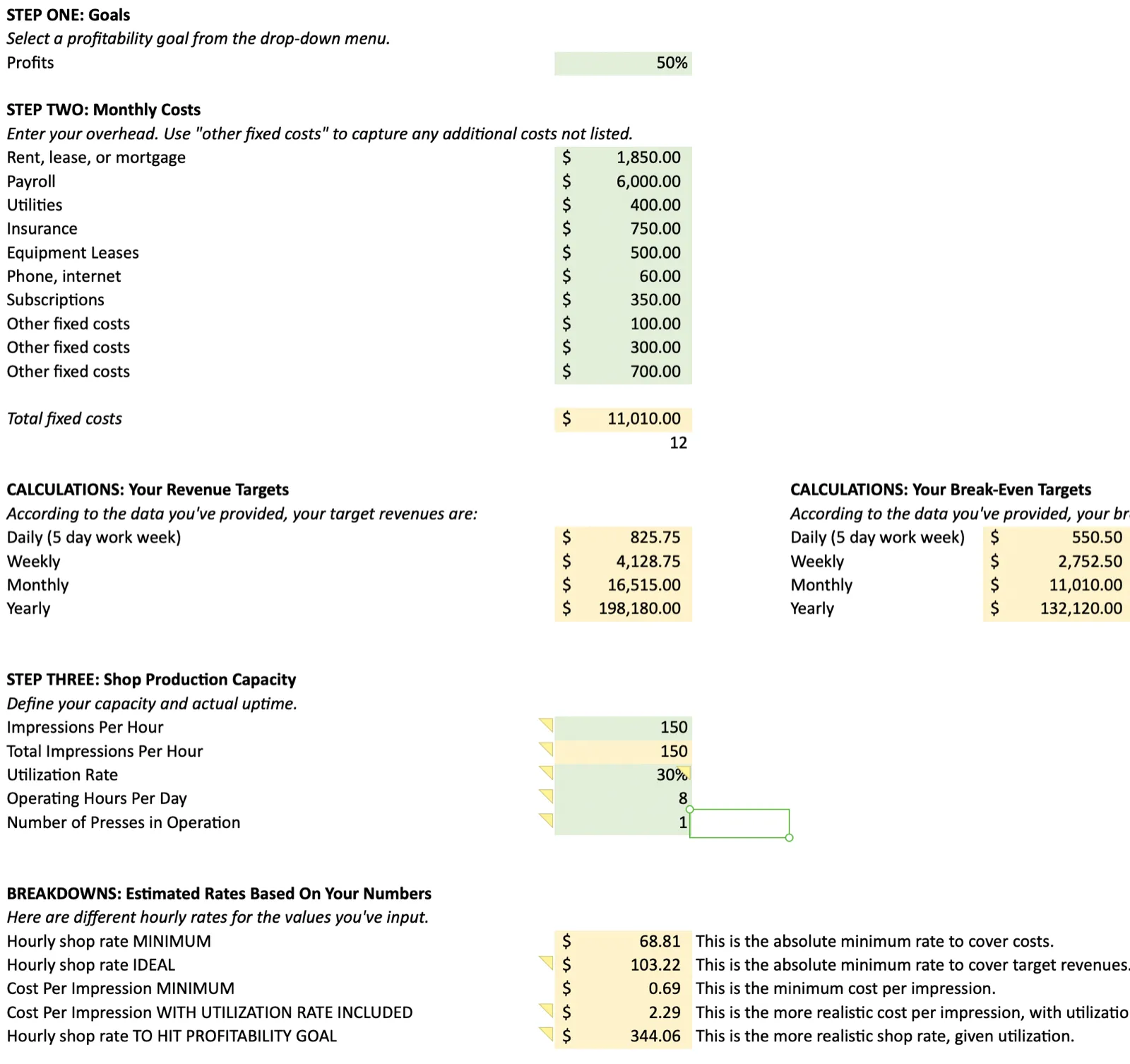
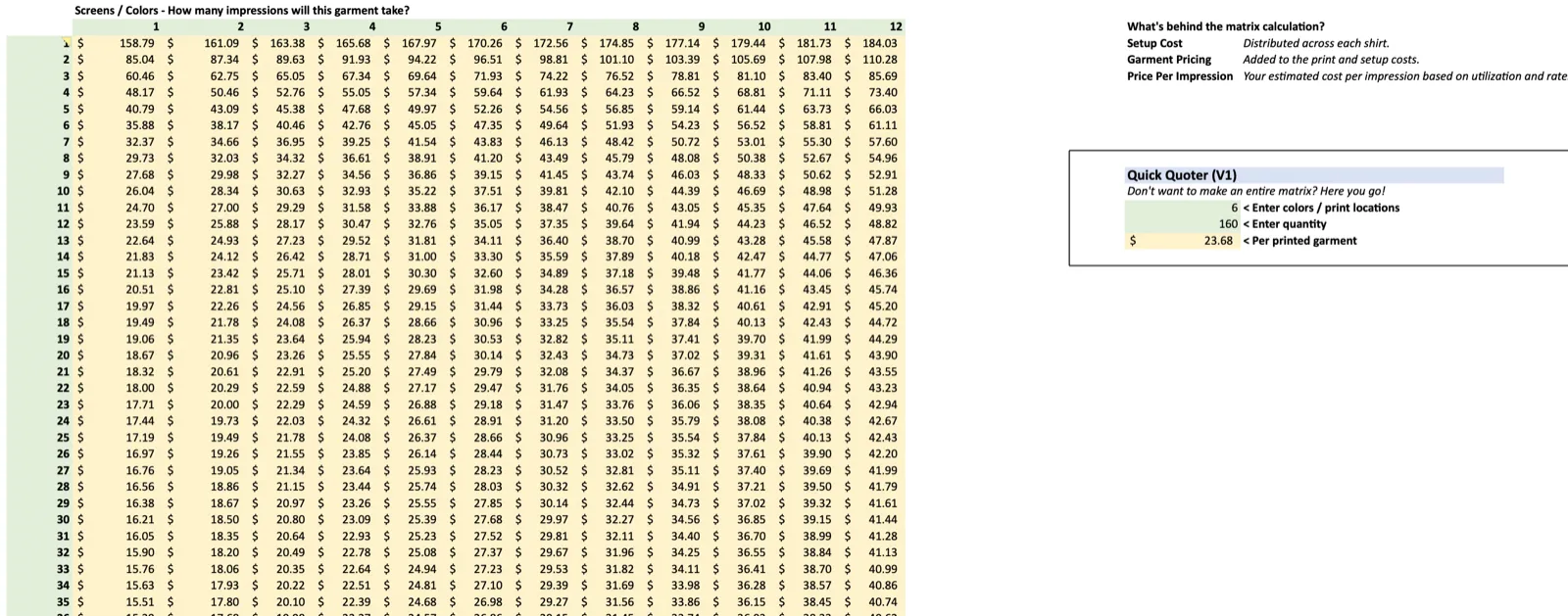
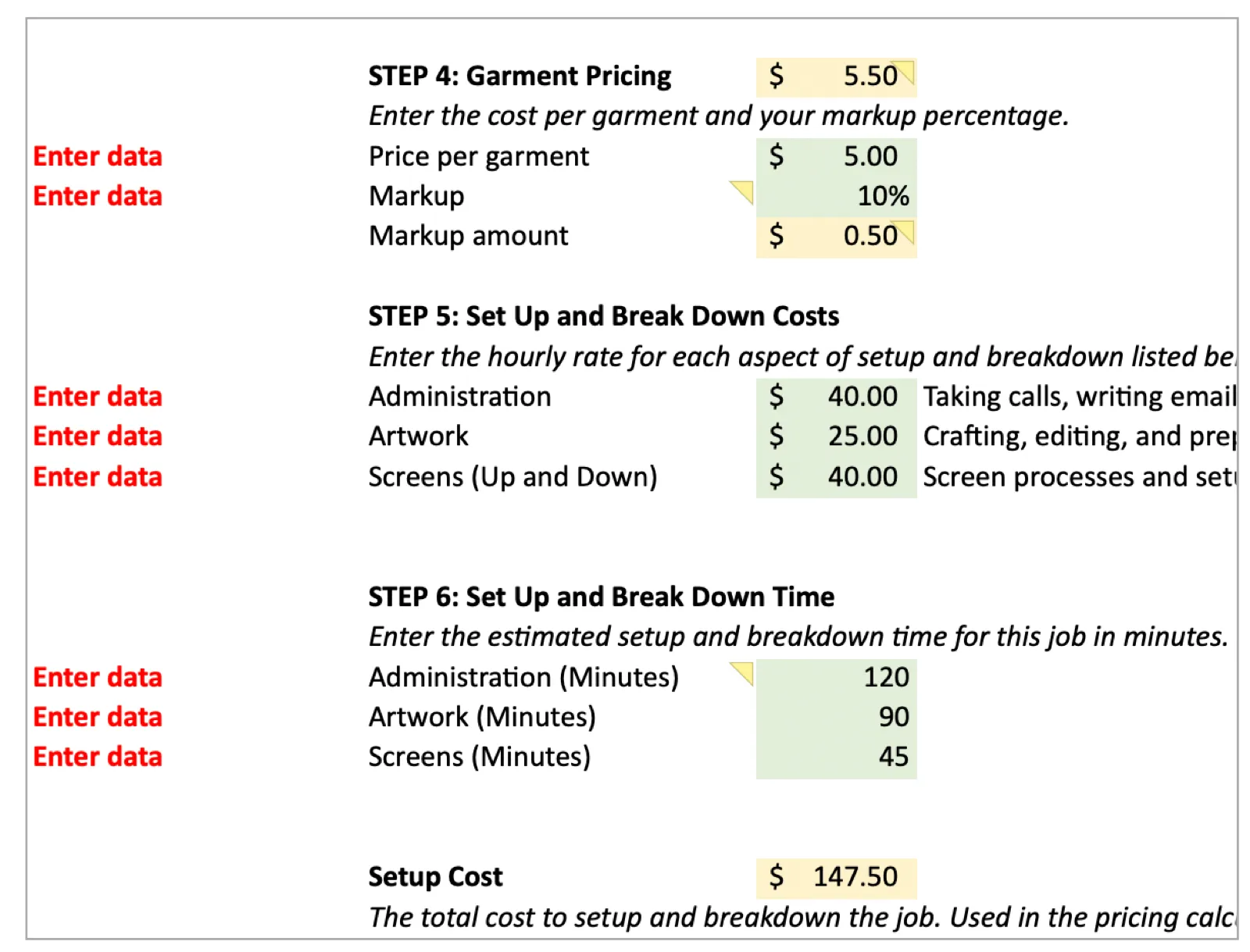
Setup and breakdown, impressions per hour, utilization, artwork and administrative time, cost per impression — all of it had to resolve into a single number a customer could say yes to.
The system
As the work grew, instinct alone wasn’t enough. The relationship needed infrastructure.
What emerged wasn’t a linear production pipeline. It was a loop — every handoff fed the next discovery.
The operating system
Nine steps, run as a loop rather than a pipeline. Process: Discover → Develop → Prove → Cost + source → Prepress → Produce → Verify → Hand off → Learn → and back to Discover.
Nine steps, run as a loop rather than a pipeline
Prove
A customer proof — the third step of the loop, made concrete
The point
The system wasn’t built to replace the relationship. It was built to protect it.
Range
One system. Very different problems.
The system stayed consistent. The work absolutely did not. Different customers brought different artwork, garment types, quantities, aesthetics, timelines, production requirements, and expectations.
That was the point. The process created enough structure underneath the work that the output itself never had to become standardized.
Scale
The objective wasn’t efficiency for its own sake. It was consistency.
As volume increased, the experience still had to feel like The Print Shop. The care given to an independent artist’s illustration had to survive when the quantity became hundreds of garments.
The result
The job required seeing two scales at once.
At one scale was the microscopic: a single line in an illustration, a dot of ink, squeegee pressure, a garment slightly out of registration.
At the other was the whole system: pricing, capacity, customer communication, sourcing, production scheduling, quality control, fulfillment, profitability, growth.
The visible product is usually only the final few inches of a much larger system. Customers didn’t need to understand every variable behind their order. They needed to know that someone understood what they were trying to make, and could reliably turn it into something real.
I built the machinery underneath the experience so the experience could stay human.
04
04 — Creative Mentorship & Training
LinkNine years mentoring 2,700+ creative learners to portfolio-ready work — across design, photography, filmmaking, animation, and visual arts. Nearly ten curricula built. Daily broadcast operation shipped. The kind of training instincts most creative teams wish their senior designers had. The Rebel News Network case study below is the clearest version of it: a system built so thoroughly that the people I trained ended up running it without me.
04.1
Case study
LinkColumbine High School · 2016–2023
Intro
When I joined Columbine in 2016 to teach video production, graphic design, and digital photography, Rebel News Network already had a long history. It had once been a true live television production, distributed through analog infrastructure to televisions throughout the building. By the time I arrived, that system was gone. Students recorded and edited announcements twice a week, exported the finished program, and handed it to teachers to play in classrooms.
It worked. But I saw an opportunity to turn a filmmaking class into something much bigger.
I had no background in live broadcasting and no requirement to rebuild any of it. I taught myself what I needed to know, worked through the institutional and technical constraints, and began building.
01 — What I inherited
The content survived. The broadcast operation didn’t.
Students read announcements from printed scripts, often looking down at the page rather than at the camera. Episodes were edited, exported, uploaded to the school server, and manually played by teachers.
It delivered information. It offered almost no immediacy, no audience connection, and no opportunity to develop the disciplines of live production.
Pre-recorded
The inherited format — watch where the anchors are looking
02 — Prove the idea
Before I could improve the broadcast, I had to make broadcasting possible.
I inherited a purpose-built studio with lighting, power, and a small four-channel mixer. My initial budget allowed for little more than a camera capable of feeding the stream and a compact encoder. That was enough to prove the idea.
The larger obstacles were outside the studio. District policy, student privacy, licensing agreements, Google Workspace ownership, YouTube permissions, and broadcast access all affected whether students could be streamed to classrooms at all. I worked through those constraints with school and district leadership while solving a second, deceptively difficult problem: how do you make a livestream reliably accessible to every classroom in the building?
Leadership was willing to trust the experiment. I needed to make that trust worthwhile.
03 — Fix the input
A live broadcast is only as organized as the information feeding it.
Before the rebuild, announcements arrived through emails, handwritten notes, conversations in passing, and messages left in my mailbox. Live production couldn’t operate that way.
I replaced the fragmented intake with a standardized form and trained faculty across the building to use it. Every morning I arrived before the rest of the school to turn those submissions into the day’s broadcast. As RNN matured, the same form expanded to accept graphics and prerecorded media directly from clubs and organizations.
I wasn’t just rebuilding the output. I rebuilt the input.
Information flow
How a submission became airtime. Process: Faculty + leadership → Centralized intake → Editorial → Prompter → Anchors.
How a submission became airtime
The window
5:00
The entire system had five minutes to work.
RNN started inside a tightly protected five-minute window. Every announcement competed for finite airtime, and running long meant taking instructional time from an entire building full of teachers.
The broadcast had to be useful enough that people valued it, consistent enough that teachers trusted it, and disciplined enough that it never became an intrusion.
The daily editorial call
04 — First live
The classroom became a studio.
The first digital livestream changed student behavior immediately. The printed scripts disappeared. Students read from a monitor positioned beneath the camera, which brought their attention toward the lens and created a far more direct relationship with the audience.
And something significant happened on the very first live broadcast: the principal used it. His branded Christy 60 segment appeared in RNN’s first-ever livestream. The platform was experimental. Leadership participation wasn’t.
First live
The first digital livestream, with the principal’s segment built in from day one
05 — Design the interface
Make the next action obvious.
For about five years, RNN’s teleprompter was a carefully designed slide deck. It was deliberately simple. Warm-up and countdown slides embedded the operating instructions directly into the sequence, so the interface taught the job while the job was happening.
It didn’t need to look sophisticated. It needed to work instantly for a teenager under live-production pressure.
Process artifact
The teleprompter, as the crew saw it
The legend
Read the full teleprompter document (PDF) — a reconstruction from the production system rather than an archival copy, kept intact so the structure is visible.
Seconds of stream delay
13–22
We couldn’t eliminate the delay. So we choreographed around it.
The livestream took roughly 13 to 22 seconds to reach classrooms, and dead air after the Pledge of Allegiance cost attention immediately. So the pledge became part of the production clock.
The student reader followed a meticulously consistent script carrying timing, breathing, standing and sitting, and inflection cues. The crew began its countdown during the final lines — “…one nation…” prepare, “…under God…” stand by, “…indivisible…” go — so the stream launched before the pledge finished in the studio and arrived in classrooms just as it ended there.
A technical limitation became part of the production rhythm. More than 1,900 people eventually learned that rhythm.
06 — Watch the audience
A successful stream isn’t necessarily a successful experience.
Students observed broadcasts from the backs of real classrooms. We watched when students looked up, when they disengaged, which segments held attention, how dead air affected the room, and what brought attention back.
Those observations drove pacing, transitions, segment length, presentation, and the overall rhythm of the show.
The feedback loop
Every broadcast was also research. Process: Broadcast → Observe → Learn → Adjust → and back to Broadcast.
Every broadcast was also research
07 — Build the crew
Practice failure before failure matters.
Students ran repeated dummy livestreams and rotated through every production role — anchor, camera, audio, graphics, prompter. Those rehearsals weren’t auditions for one ideal type of student. They were how students found where they worked best.
Some belonged on camera. Some wanted nothing to do with it. Some loved audio. Others gravitated toward graphics, switching, directing, or technical troubleshooting.
I opened the program to freshmen, which created a longer development pipeline and let experienced students train the crews coming up behind them. Filmmaking students eventually built training videos for future RNN students as coursework — recording, editing, animation, instructional design, and subtitling in one assignment. Learning the system eventually included teaching the system.
The training pipeline
How a freshman became the person training the next crew. Process: Rotate → Fail safely → Discover → Specialize → Shadow → Teach → Lead.
How a freshman became the person training the next crew
08 — Build around friction
Every upgrade needed to solve a problem.
Once the live model proved itself, the infrastructure could grow. Nothing was bought because it was better equipment. Each change removed a specific piece of friction the crew hit every morning.
09 — Failure becomes procedure
A failing converter scrambled the broadcast audio for two days.
We worked through the signal chain systematically, testing connection after connection until we isolated it: an SDI/HDMI converter that required a power cycle after the rest of the system booted. From then on, that was part of startup.
How problems became procedure
Diagnosis turned into documented startup steps. Process: Failure → Diagnosis → Solution → Procedure.
Diagnosis turned into documented startup steps
Minutes of airtime
5 → 10 → 20
Trust changed the size of the platform.
RNN began with five minutes. As reliability and adoption grew, leadership granted the program ten minutes every school day, and the principal’s Thursday programming could eventually run to roughly twenty.
It became the primary channel for information students weren’t reliably getting through email: district-mandated information, code of conduct, SAT and PSAT preparation, school events, leadership communication, athletics, activities, recognition, and special programming.
RNN began by delivering announcements. It became communications infrastructure.
10 — The school moved into the studio
Leadership became recurring talent.
The principal owned Thursdays. The athletic director had a Tuesday segment. Student Senate anchored special weeks. Clubs and organizations appeared directly, and students created original programming.
The RNN Film Festival pushed filmmaking beyond the classroom and created demand for the program itself — students enrolled because they saw what RNN was producing and wanted in. Anchors became recognizable throughout the building, and several went on to elected and highly visible student roles. Many continued into filmmaking, media, design, and related creative fields after graduation.
The audience became participants.
11 — Covid: the stress test
Then the studio disappeared. The network didn’t.
Covid removed the environment the whole system had been designed around. Students were home. Teachers became anchors. I appeared on camera. Remote recordings were edited into distributable episodes, and RNN produced mental-health programming and partnered with Student Senate on community programming and talent shows.
The production mechanism changed because it had to. The purpose didn’t: keep the community connected.
Continuity
Remote production, 2020
12 — Build the room around the work
The first studio taught me how live production worked. The second was designed around how we actually worked.
Eventually I gave RNN’s oversized studio space to Student Senate — using an enormous room for a fraction of each day no longer made sense. I moved the operation into a storage room and rebuilt the studio around years of accumulated production knowledge: new cabling, a custom lighting rack, LED cans, DMX control, an ATEM Television Studio Pro, dedicated audio monitoring, six matching monitors, and a scrolling teleprompter.
13 — The arrival
The system got more complex. Using it got easier.
This episode features two staff members with no prior hosting experience appearing on camera to share personal testimonials and encourage students to join the annual Columbine Day of Service, held in remembrance of the Columbine shooting.
They look comfortable. They look prepared. They look like they belong there. That’s the point — by this stage the production system carried the complexity for them.
The arrival
Faculty anchors, live graphics, and a student-run crew carrying the whole show
The evolution
Three eras of the same broadcast. Process: Pre-recorded → First live → The arrival.
Three eras of the same broadcast
What actually changed
The transformation wasn’t low tech to high tech. It was more capability, less friction.
What I designed
14 — The coffee test
The goal was to make myself unnecessary.
Every semester I told students what success looked like: I wanted to sit back, drink my coffee, and watch them run RNN.
Eventually I could. Students switched the show, operated audio, advanced the prompter, ran graphics, handled cameras, directed talent, solved problems, and trained the crew coming up behind them. My role shifted from operating the system to creating the conditions in which other people could operate it successfully.
The best broadcast wasn’t the one I ran perfectly. It was the one I didn’t have to run at all.
Contact
I'm open to full-time, contract, hybrid, and remote roles — instructional design, customer education, multimedia design, creative production, or any combination that uses both halves of the brain. I respond to every email within a day.